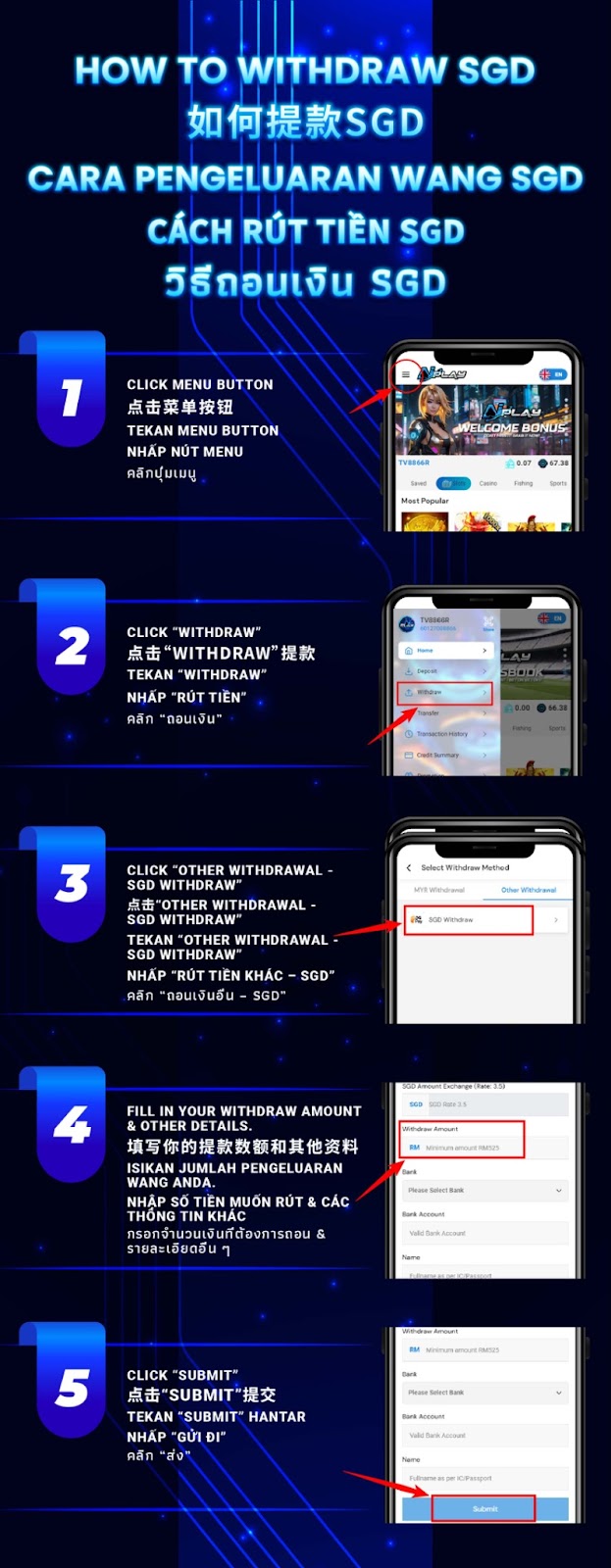
From the AiPlay home screen, tap the menu button to access your account actions and wallet features.
Choose Withdraw to enter the withdrawal area where you can select withdrawal types and currencies.
Go to Other Withdrawal, then select SGD Withdraw to proceed with a Singapore Dollar withdrawal request.
Fill in your SGD withdrawal amount and complete the required fields, such as bank name, account number, and your registered full name. Double-check accuracy to avoid delays.
After confirming all information, tap Submit to send your SGD withdrawal request for processing under AiPlay’s policies.
Ensure the bank name and account number are accurate before submitting. Incorrect details may lead to rejection or additional verification, slowing down the withdrawal process.
If the withdrawal form displays a minimum limit, make sure your requested amount meets or exceeds it. Requests below the limit cannot be processed.
Avoid switching apps or refreshing the page while filling out the withdrawal form. Staying on the page ensures your request submits correctly without interruptions.
Once you submit your withdrawal, the request enters AiPlay’s processing queue. If additional verification is required, customer service may contact you to confirm your identity or account details.
If your withdrawal status does not update or if you entered incorrect information, contact AiPlay support. Providing your account details and relevant screenshots will help the team resolve your issue faster.
Use AiPlay and to follow the exact SGD withdrawal steps: select SGD under Other Withdrawal, enter accurate banking details, and submit your request smoothly.
AIPLAY is among the most successful online live casino in Malaysia. AIPLAY offer a stress-free and easier way for customer to do deposit and withdraw digitally. Each transaction can be completed quickly and effortlessly. These highlights make gaming in AIPLAY secure as well as pleasant so players feel comfortable when committing to our website.