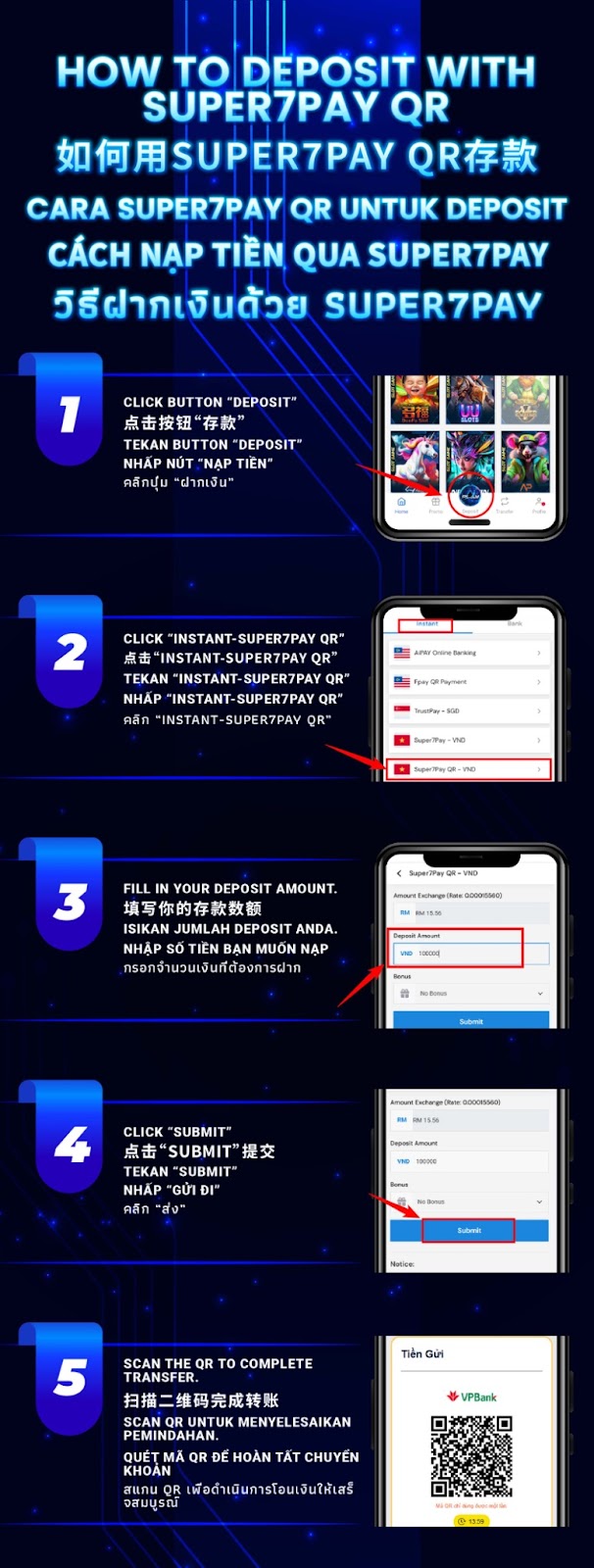
Log in to AiPlay, go to your cashier/wallet area, and open Deposit to see all available payment options.
Under the Instant tab, choose Super7Pay QR – VND to start a VND deposit using a QR-based payment flow.
Fill in your desired VND deposit amount. Check the exchange display shown on-screen so you understand the estimated RM value before continuing.
Press Submit to confirm the amount and create the QR payment step for your Super7Pay QR VND deposit.
Use your supported banking or payment app to scan the QR code and complete the transfer. After successful payment, return to AiPlay and wait for the deposit status to confirm.
Keep the deposit page open while you pay. Switching apps is normal for QR payments, but avoid refreshing or closing the deposit screen mid-process.
QR payments are often processed quickly. Confirm your entered VND amount and proceed only when everything looks correct.
Save a confirmation screenshot after the transfer. If you need support, your proof of payment helps the team verify faster.
Once payment is confirmed, your AiPlay balance updates after processing. Timing can vary depending on the bank network and connection conditions.
If you completed payment but your balance hasn’t updated, contact customer support with your transaction proof so they can assist with verification.
Use AiPlay and offering clear guidance: choose Instant–Super7Pay QR–VND, enter your amount, submit, and scan the QR code to complete your deposit smoothly.
AIPLAY is among the most successful online live casino in Malaysia. AIPLAY offer a stress-free and easier way for customer to do deposit and withdraw digitally. Each transaction can be completed quickly and effortlessly. These highlights make gaming in AIPLAY secure as well as pleasant so players feel comfortable when committing to our website.