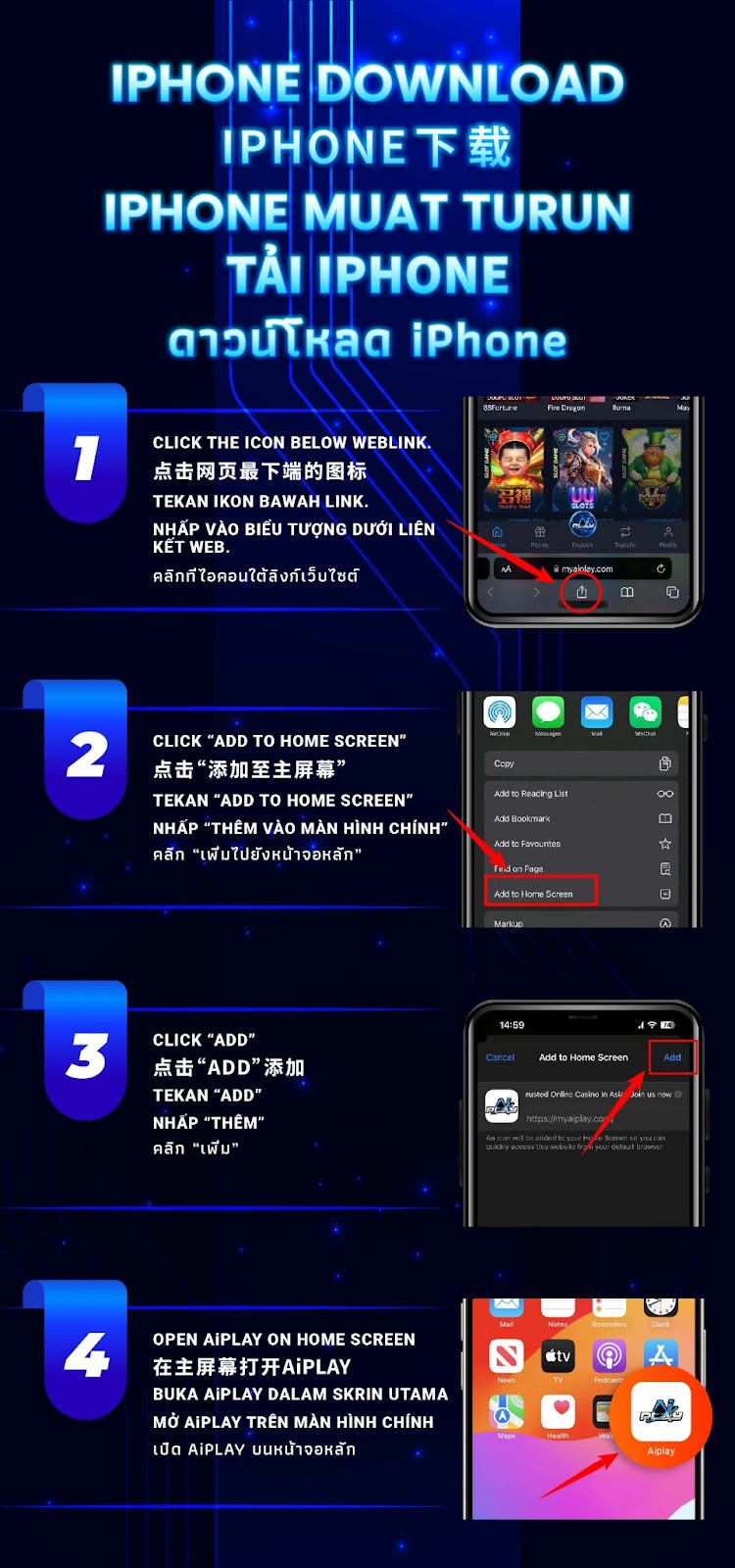
At the bottom of your Safari browser, tap the Share icon. This opens the essential menu needed to add AiPlay to your iPhone home screen.
Choose the Add to Home Screen option from the menu. This creates a direct AiPlay shortcut with instant access.
A preview screen will show the AiPlay icon and shortcut name. Tap Add to complete setup. AiPlay will now appear as an app-style icon on your home screen.
Simply tap the AiPlay icon to launch the platform instantly. With offering enhanced accessibility guidance, users enjoy fast, smooth, and secure gameplay anytime.
The “Add to Home Screen” method allows AiPlay to operate like a native app, giving fast, direct access without navigating through a browser.
AiPlay’s iPhone installation works without needing the App Store, making it convenient for all users.
Because AiPlay runs as a web-based application, it consumes minimal device storage while delivering fast performance.
iPhone requires Safari to enable the “Add to Home Screen” feature. Other browsers may not support this function.
A strong connection ensures AiPlay loads quickly during initial setup and daily usage.
Safari may request certain permissions for icon installation or page loading. Approve these to complete the process smoothly.

Follow the quick setup steps and enjoy instant access with AiPlay and offering a reliable, fast, and user-friendly iOS experience.
AIPLAY is among the most successful online live casino in Malaysia. AIPLAY offer a stress-free and easier way for customer to do deposit and withdraw digitally. Each transaction can be completed quickly and effortlessly. These highlights make gaming in AIPLAY secure as well as pleasant so players feel comfortable when committing to our website.