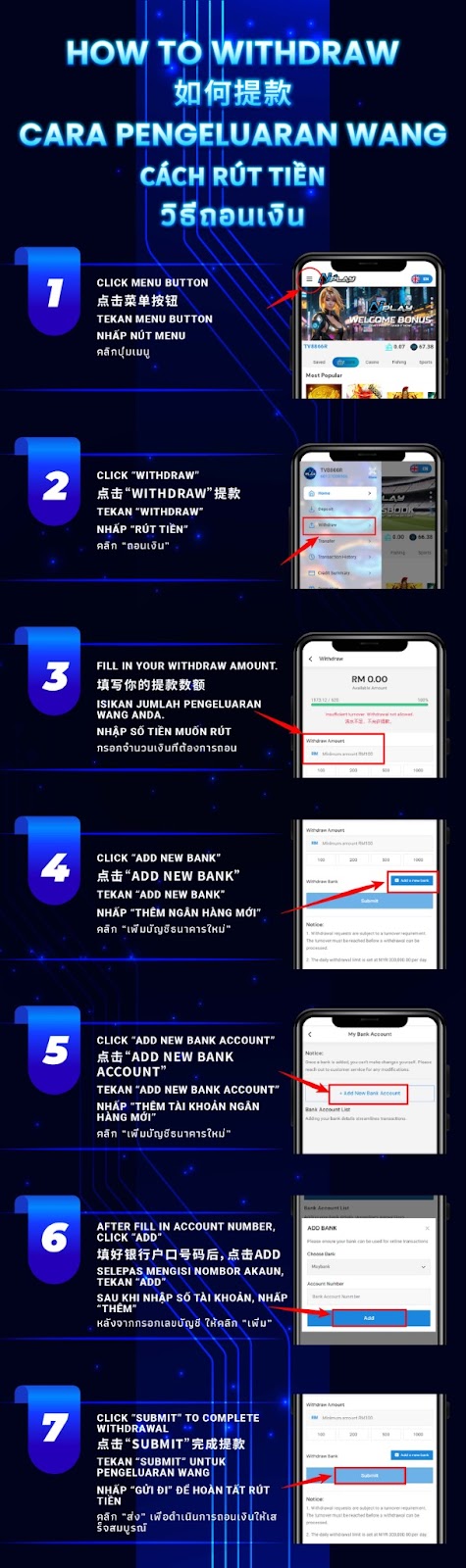
From your AiPlay home screen, tap the menu button to open your account options and wallet features.
Select Withdraw from the menu to access the withdrawal page where you can set an amount and choose a payout method.
Fill in the withdrawal amount you want to cash out. Make sure the amount matches your available balance and any minimum requirements shown on screen.
If you haven’t saved a payout account yet, tap Add New Bank to begin setting up your bank details for withdrawals.
Inside the bank management page, choose Add New Bank Account to start registering your bank information for future withdrawals.
Select your bank, enter your account number correctly, then tap Add to save it. Double-check for typos to avoid processing delays.
Return to the withdrawal form, select your saved bank account (if required), then tap Submit to send your withdrawal request for processing.
Ensure your bank name and account number are correct and belong to you. Incorrect details may cause rejection or longer verification.
Where applicable, keep your bank account holder name consistent with your registered details to support smoother checks.
Avoid refreshing or switching devices mid-process to reduce form errors and submission issues.
After submission, your request will enter the platform’s processing flow. If any verification is needed, customer support may request additional confirmation.
If your withdrawal doesn’t update or you entered incorrect bank details, contact customer service with your account info and relevant screenshots for faster assistance.
Follow the AiPlay steps with supporting clarity: add your bank once, enter your amount, and submit your request to complete your withdrawal smoothly.
AIPLAY is among the most successful online live casino in Malaysia. AIPLAY offer a stress-free and easier way for customer to do deposit and withdraw digitally. Each transaction can be completed quickly and effortlessly. These highlights make gaming in AIPLAY secure as well as pleasant so players feel comfortable when committing to our website.