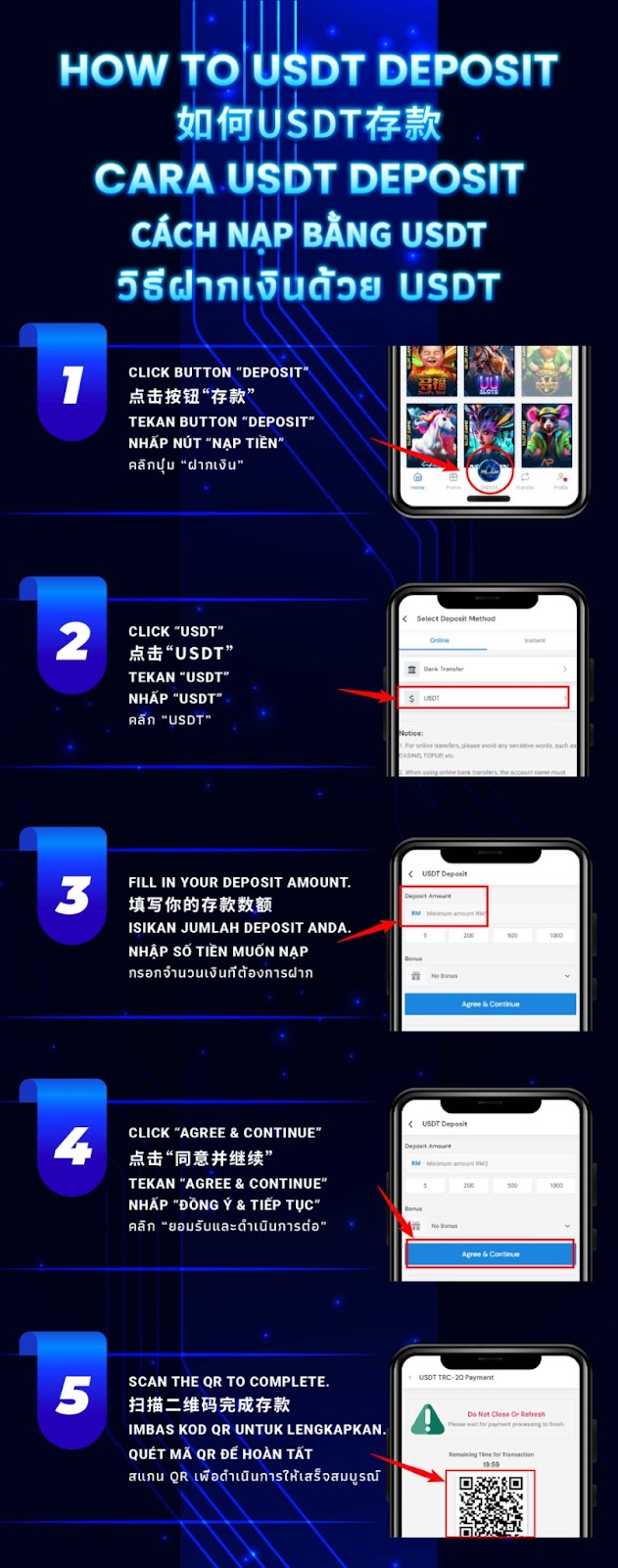
Log in to your AiPlay account and tap Deposit to open the available funding methods.
From the list of deposit options, choose USDT to begin a TRC-20 transfer flow designed for crypto payments.
Type in the USDT amount you want to deposit and confirm the value carefully before proceeding.
Continue to the payment screen by tapping Agree & Continue, which will generate the deposit details for your transfer.
Use your crypto wallet to scan the QR code and send USDT via the TRC-20 network. Keep the page open until you see a successful transfer confirmation.
Always select TRC-20 in your crypto wallet before sending. Using the wrong network can lead to delays or even permanent loss of funds.
The QR deposit address may expire after a short countdown. Scan and confirm your transfer promptly to avoid restarting the deposit process.
Ensure the amount you send from your wallet matches the value entered on the AiPlay deposit page. Incorrect amounts may cause verification delays.
After your wallet broadcasts the transaction and the TRC-20 network confirms it, your AiPlay balance will automatically update based on the final deposit status.
Save your transaction hash (TXID) and a screenshot of the deposit attempt, then contact AiPlay customer support. Providing these details helps the team verify your deposit quickly.
Start your crypto top-up with AiPlay and offering step-by-step support—choose USDT, enter your amount, and scan the QR code using TRC-20 to complete your deposit smoothly.
AIPLAY is among the most successful online live casino in Malaysia. AIPLAY offer a stress-free and easier way for customer to do deposit and withdraw digitally. Each transaction can be completed quickly and effortlessly. These highlights make gaming in AIPLAY secure as well as pleasant so players feel comfortable when committing to our website.