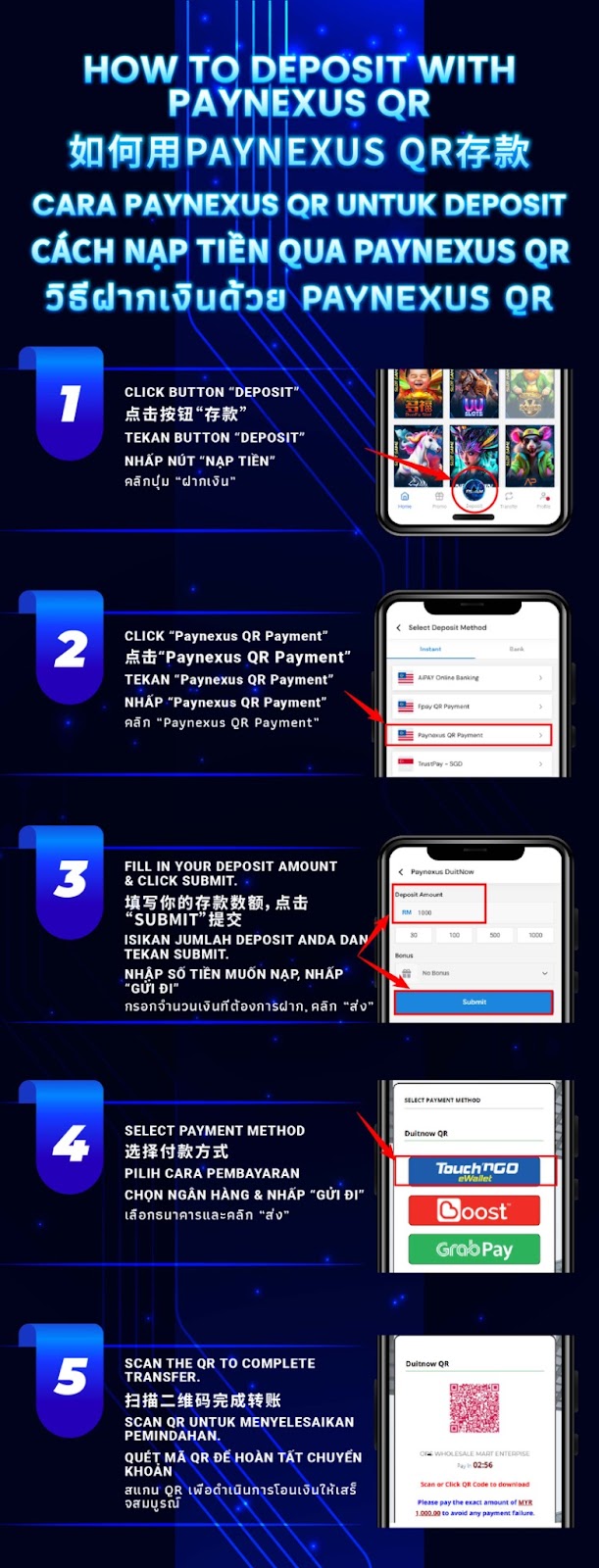
Log in to AiPlay, open the wallet or cashier section, and tap Deposit to view the available funding methods.
Select the Instant option and choose FPAY Online Banking / FPAY QR Payment to begin the QR-based deposit flow.
Fill in your preferred deposit amount carefully. Double-check the number before proceeding to avoid submission mismatches.
Tap Submit to continue. AiPlay will generate the FPAY QR payment page containing your unique QR code.
Provide your full name for verification as required, then tap Submit to move to the QR payment screen.
Use your mobile banking or e-wallet app to scan the FPAY QR code and confirm your payment. Keep the page open until your transfer fully completes for successful deposit processing.
If the FPAY page requires an exact amount, enter and pay the same value to help your deposit match and confirm smoothly.
Enter your real full name (as requested) so the payment record can be verified more easily.
Avoid refreshing or closing the page while the QR code is active, so you don’t interrupt the payment session.
Once the payment is successful, your AiPlay balance should update after verification completes. Processing time may vary depending on bank speed and network conditions.
Save a screenshot of the successful payment from your banking app and contact support with the details for faster checking. Providing proof helps the team verify your deposit quickly.
Use AiPlay and offering guided steps—select Instant FPAY, enter the correct amount and full name, then scan the QR code to finish your deposit securely.
AIPLAY is among the most successful online live casino in Malaysia. AIPLAY offer a stress-free and easier way for customer to do deposit and withdraw digitally. Each transaction can be completed quickly and effortlessly. These highlights make gaming in AIPLAY secure as well as pleasant so players feel comfortable when committing to our website.