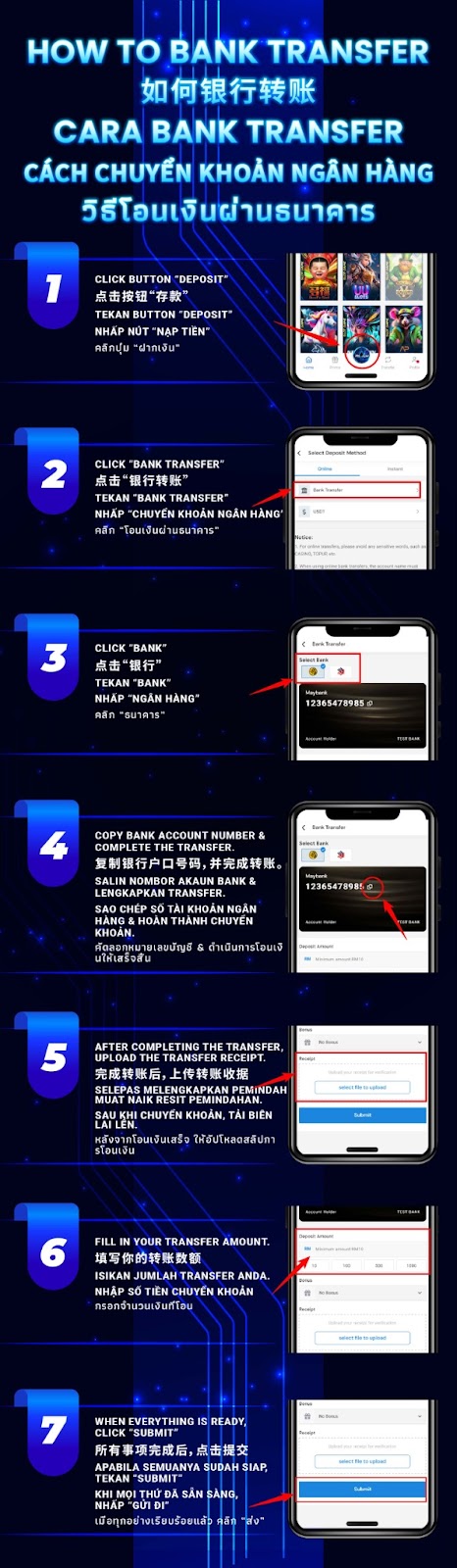
Open your AiPlay app, go to the main navigation, and tap Deposit to begin the funding process.
From the list of deposit methods, select Bank Transfer to continue with a standard bank transfer top-up.
Tap Bank to choose the banking option displayed within the Bank Transfer deposit page.
Copy the bank account number shown on the screen, then perform the transfer using your banking app. Ensure the transferred amount matches what you intend to enter back in AiPlay.
After completing the transfer, upload your transfer receipt in AiPlay for verification. This step helps speed up the processing time.
Type in the exact amount you transferred so the system can match it correctly with your uploaded receipt.
Review all details carefully, then tap Submit to send your bank transfer deposit request for processing.
Always copy the bank account number directly from the deposit page and double-check your transfer amount before submitting. This reduces mismatches that may slow down verification.
Make sure your uploaded receipt is clear and readable. It should display the transferred amount, date and time, and transaction reference to help the verification team process it smoothly.
Submit your bank transfer details immediately after completing the payment. Prompt submission makes it easier for the team to locate your transaction and speeds up the approval process.
Follow this AiPlay and guide: select Bank Transfer, copy the destination account, upload your receipt, enter the exact amount, and submit with confidence.
AIPLAY is among the most successful online live casino in Malaysia. AIPLAY offer a stress-free and easier way for customer to do deposit and withdraw digitally. Each transaction can be completed quickly and effortlessly. These highlights make gaming in AIPLAY secure as well as pleasant so players feel comfortable when committing to our website.