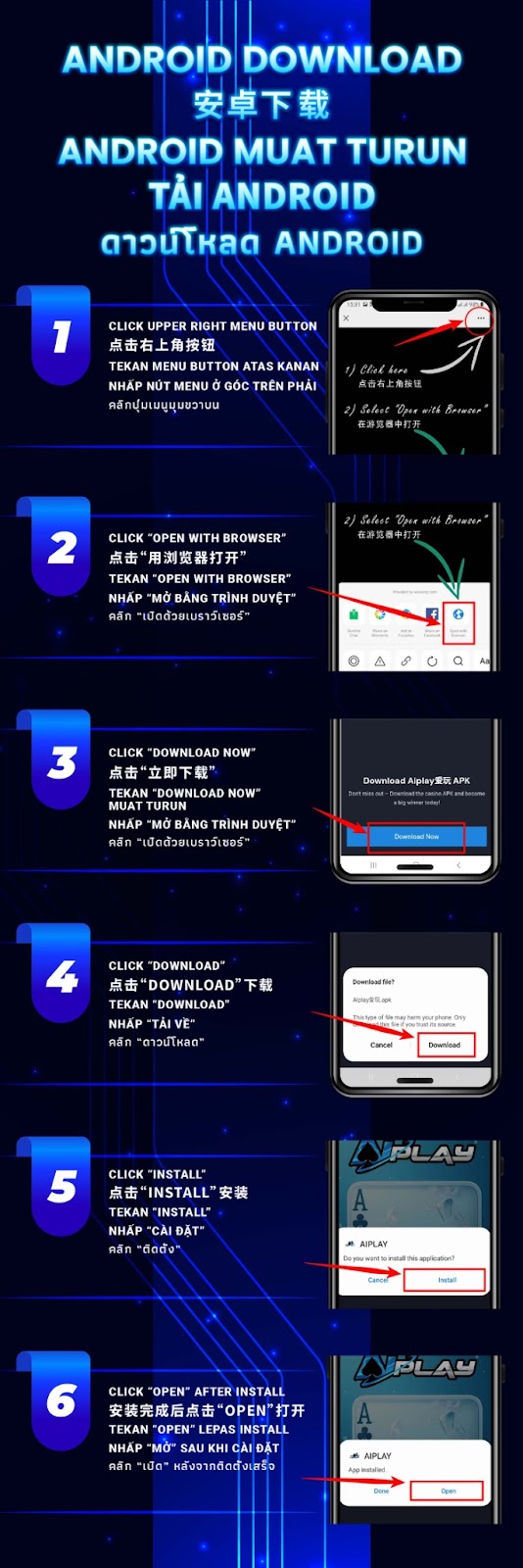
Tap the top-right corner menu button in your mobile browser. This allows you to access additional browsing options needed to start the AiPlay APK download.
Choose “Open With Browser” to ensure the APK downloads properly and does not open inside a mini in-app browser.
Press the “Download Now” button on the AiPlay download page. This begins the APK download process directly onto your device.
Your device may ask for confirmation before downloading the APK file. Tap “Download” to proceed.
When the APK finishes downloading, tap “Install.” Your phone may prompt you to allow installation from unknown sources. Approve if needed.
Once installation is complete, tap “Open” to launch the AiPlay app instantly and start enjoying all features provided by AiPlay and offering seamless mobile access.
The AiPlay Android App is optimized for speed, low latency, and reliable gameplay, ensuring players enjoy uninterrupted entertainment.
Installing via APK provides the latest app version instantly without waiting for third-party app stores.
The Android download guide is available in multiple languages including English, Chinese, Malay, Vietnamese, and Thai—making AiPlay friendly to players from diverse regions.
If your device blocks installation, go to Settings → Security → Install unknown apps and enable permission for your browser to install the APK.
A strong and stable network ensures the APK file downloads smoothly without interruption.
Make sure your device has enough free storage before installing the AiPlay APK to ensure optimal performance.
Follow the quick installation steps and enjoy seamless access to the AiPlay app, with offering reliable performance and a smooth mobile experience.
AIPLAY is among the most successful online live casino in Malaysia. AIPLAY offer a stress-free and easier way for customer to do deposit and withdraw digitally. Each transaction can be completed quickly and effortlessly. These highlights make gaming in AIPLAY secure as well as pleasant so players feel comfortable when committing to our website.