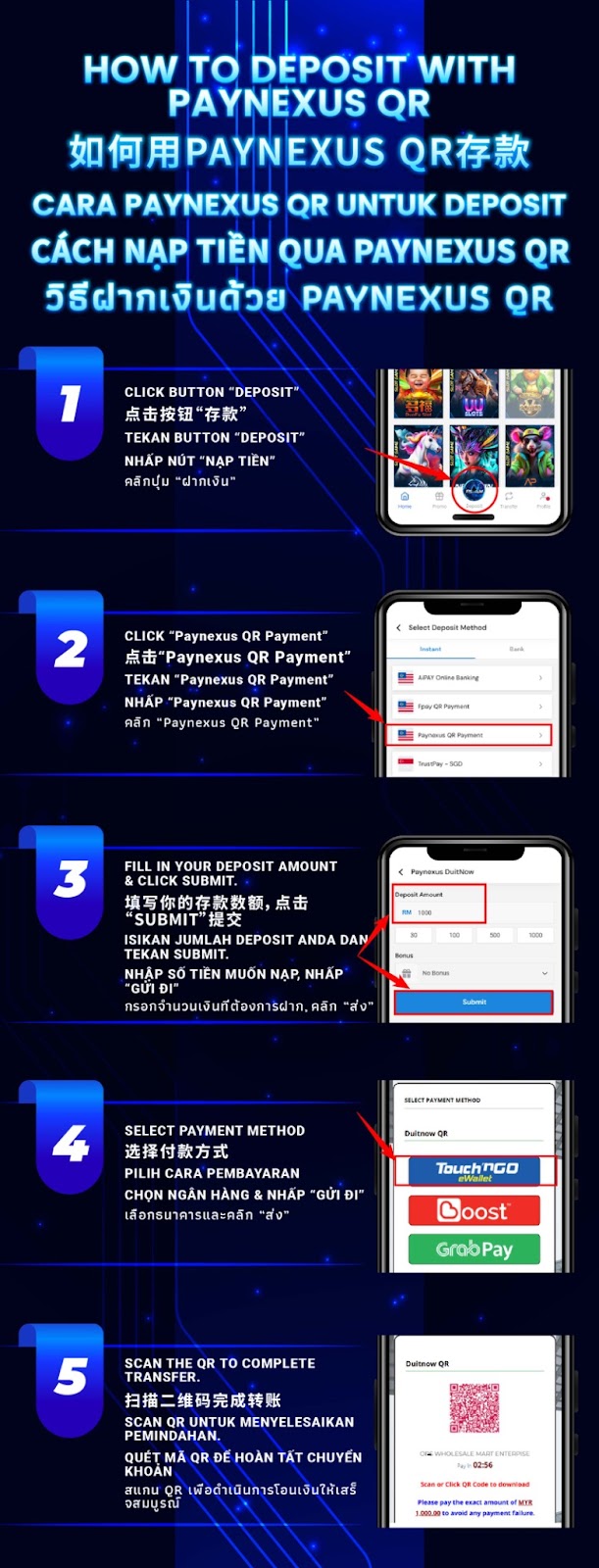
Sign in to AiPlay and open the cashier or wallet section, then tap Deposit to view available deposit methods.
Under the deposit method list, choose Paynexus QR Payment to start a QR-based deposit flow that supports popular eWallet options.
Input your deposit amount, confirm the figure is correct, and tap Submit to move to the payment selection screen.
Select the available QR payment route and pick a supported eWallet option such as Touch ‘n Go eWallet, Boost, or GrabPay, depending on what appears in your deposit screen.
Use your selected eWallet app to scan the QR code, confirm the amount, and authorize the payment to complete your Paynexus QR deposit.
Always confirm the deposit amount shown in your eWallet matches what you entered in AiPlay to reduce delays caused by mismatched payments.
Avoid refreshing or closing the QR/payment page while scanning and approving, so the transaction session stays active.
Paying from your own verified eWallet account helps your deposit review process stay consistent and avoids avoidable verification issues.
After a successful Paynexus QR payment, your AiPlay balance should update once processing completes. Timing may vary based on eWallet and network conditions.
If the balance doesn’t reflect after payment, keep your transaction proof (screenshot/receipt) and contact customer support so they can check the deposit status.
Use AiPlay and offering step-by-step guidance: select Paynexus QR Payment, enter your amount, choose your eWallet, and scan the QR code to top up quickly and securely.
AIPLAY is among the most successful online live casino in Malaysia. AIPLAY offer a stress-free and easier way for customer to do deposit and withdraw digitally. Each transaction can be completed quickly and effortlessly. These highlights make gaming in AIPLAY secure as well as pleasant so players feel comfortable when committing to our website.